

Reduce missed appointments by 22–35%
and keep your clinic schedule predictable
No complex setup. No integrations. Fewer no-shows.
Built for small and mid-size clinics
Predictable schedules and a calmer front desk — without IT hassle.
Simple workflow
Upload your schedule and let reminders run automatically.
More than reminders
Patients receive clear pre-visit instructions, guidance, and reassurance before every appointment.
What clinics typically see
In a review of 14 small private clinics using automated reminders, missed appointments dropped by an average of 28% within the first 30 days.
Example: A two-provider outpatient clinic (≈420 appointments/month) reduced no-shows from 18% to 12% in one month — recovering an estimated $3,200 in monthly revenue without adding staff.
Results vary by specialty, patient population, and workflow. Figures shown are observational and reflect real-world clinic usage, not controlled clinical trials.
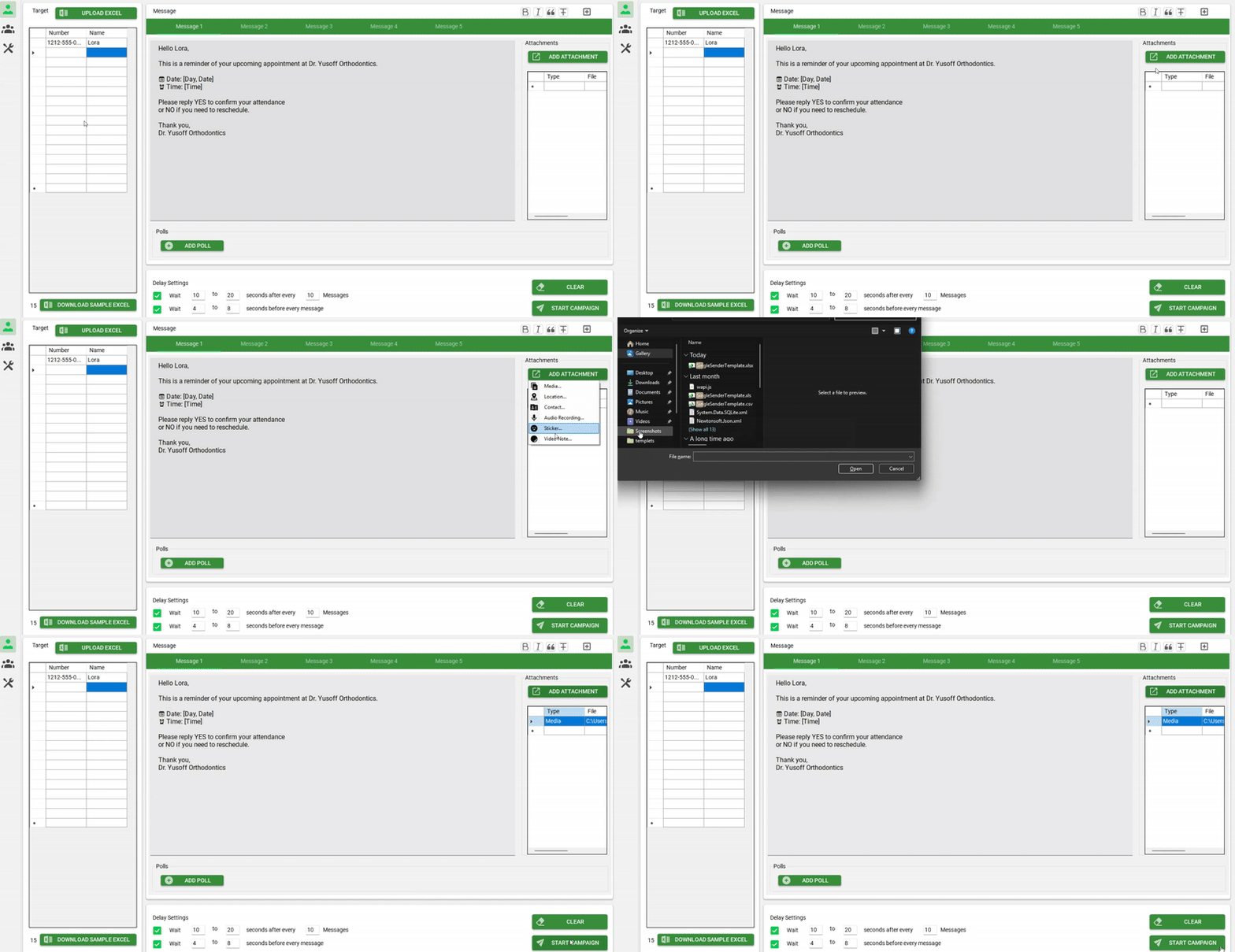
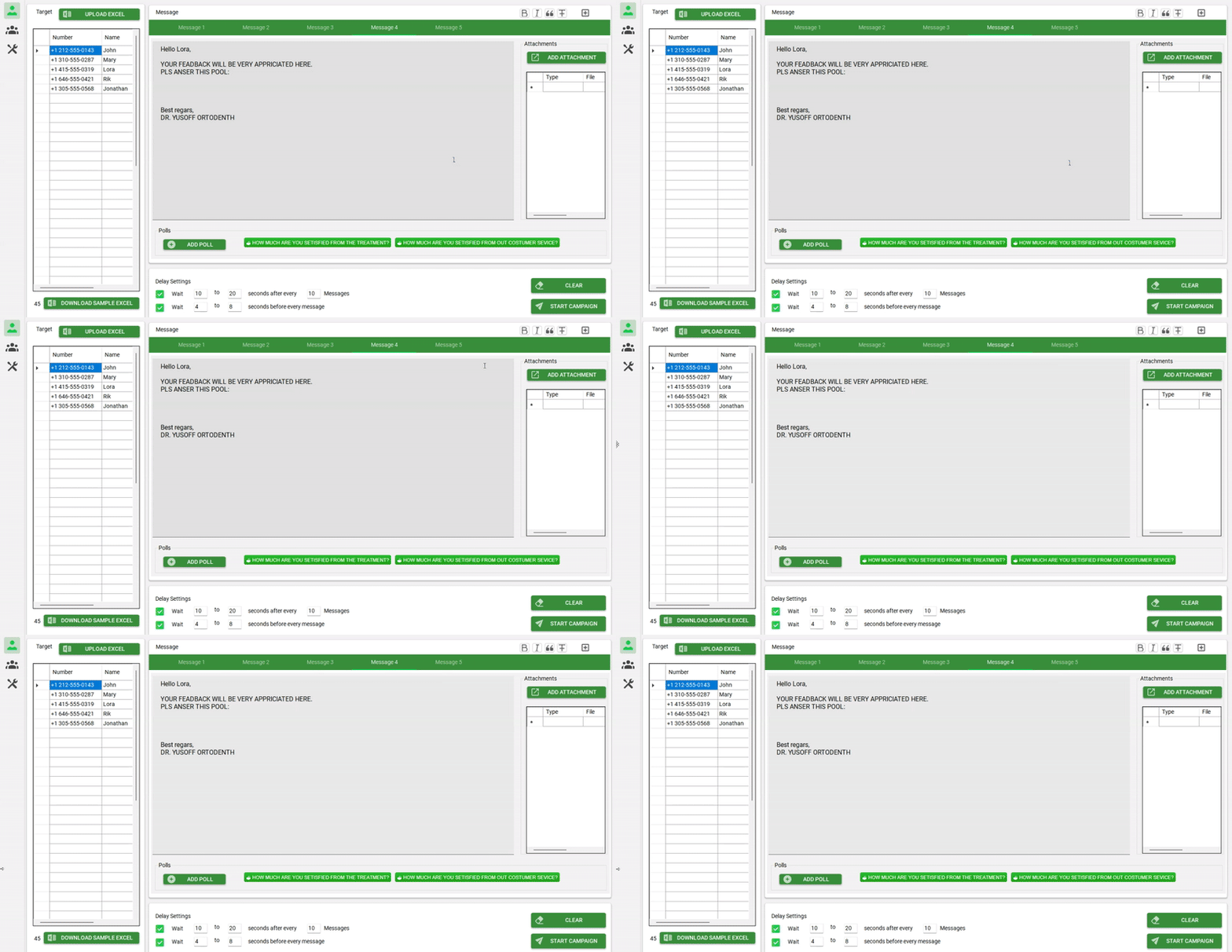
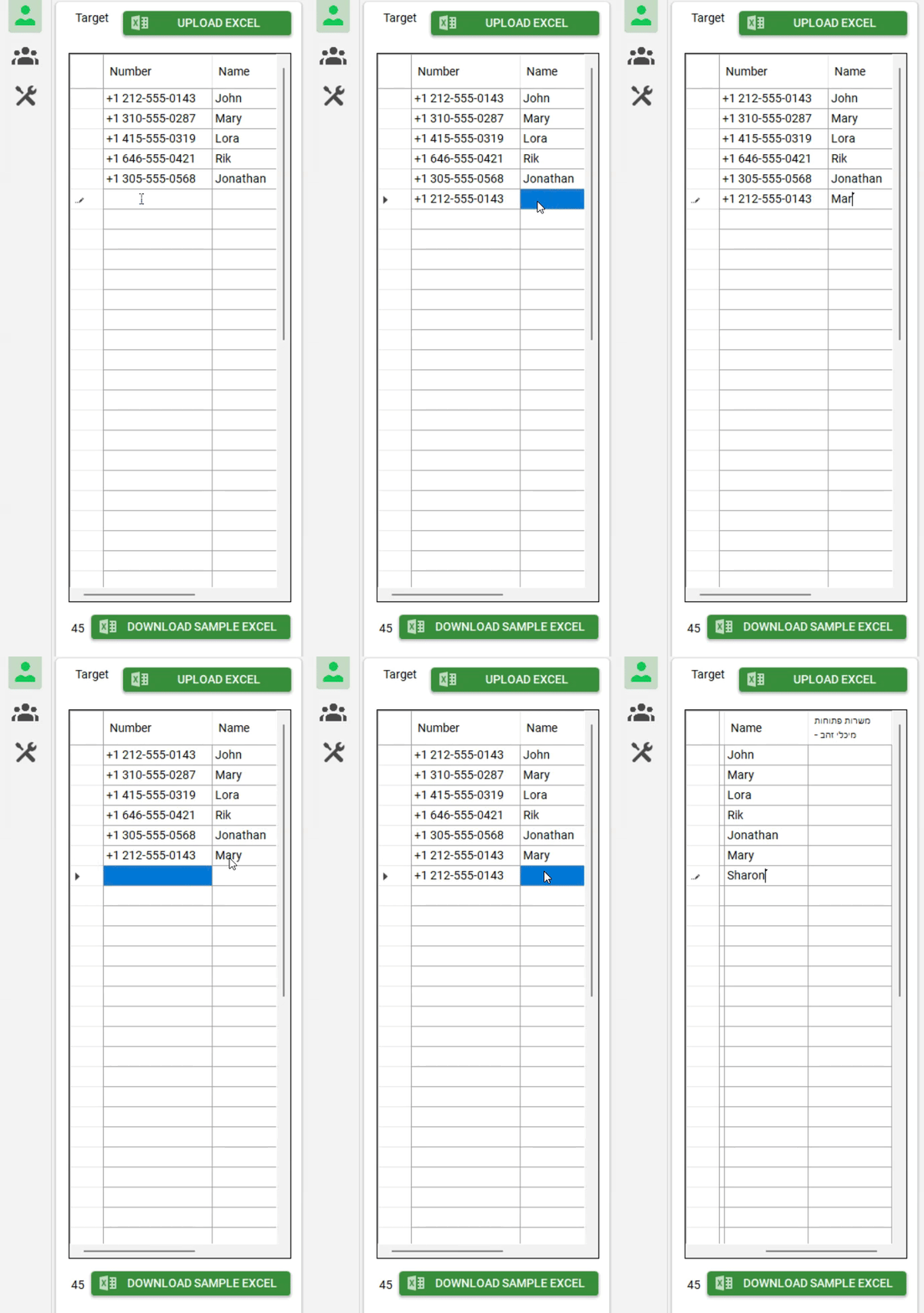
Save front-desk hours every week — automatically.
Most clinics spend 1–2 hours each day confirming appointments and following up with patients. Reminders for Clinics automates reminders on your clinic computer — freeing up staff time for patient care and front-desk operations.
A standalone, on-premise system — no complex integrations. Runs alongside your existing practice software.
-
1Export your appointment list from your current practice software.
-
2Upload the schedule to Reminders for Clinics.
-
3Reminders are sent automatically — no cloud, no APIs, no system downtime.
That’s time your team gets back — without hiring additional staff or extending clinic hours.
Standalone and reliable
Runs locally inside your clinic environment. No dependency on external services.
Works with your current workflow
No need to replace your existing practice software. Export → upload → automate.
More time for patient care
Replace manual follow-ups with a simple on-premise process.
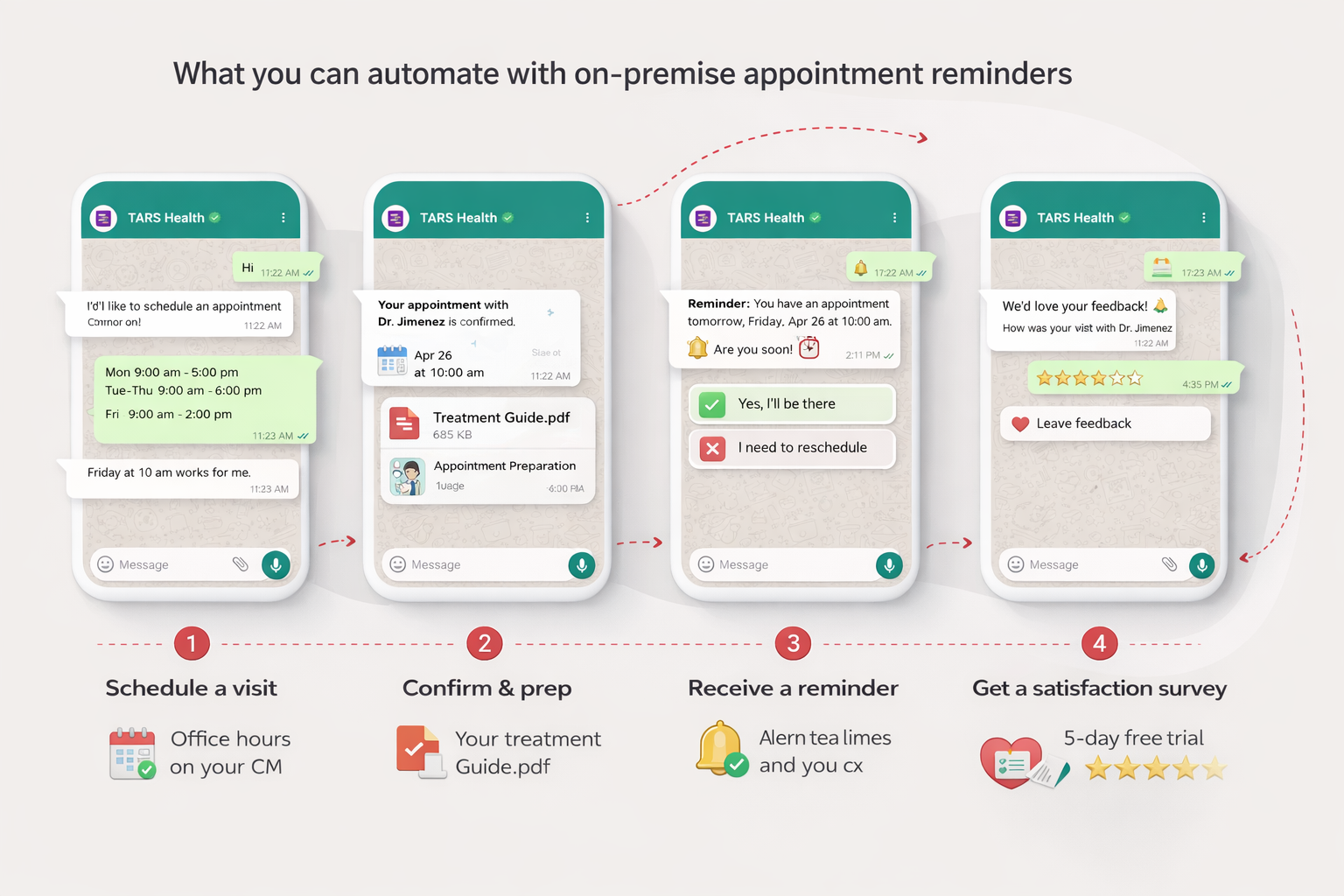
What the system automates — end to end
From incoming reschedule requests to reminders, pre-visit instructions, and post-visit surveys — all running locally on your clinic computer.
What clinics typically see in the first 30 days
Clinics using Reminders for Clinics typically see:
More confirmations completed automatically
Less manual calling and follow-up work
Faster confirmations and calmer front-desk flow
Meaningful impact from fewer no-shows
What a 22–35% reduction in no-shows can mean
- 20 scheduled appointments per day
- $150–$300 average appointment value
- ~30% reduction in no-shows
Works independently — no complex integrations or system changes
Reminders for Clinics runs as a standalone system on your clinic computer. No cloud dependency, no complex integrations, and no changes to your existing workflow.
-
1Export your appointment schedule from your practice management system.
-
2Upload the file into Reminders for Clinics.
-
3Reminders are sent automatically — no ongoing manual work required.
No disruption
No changes to your current systems or workflow.
No IT projects
No developers, integration timelines, or ongoing maintenance.
Fast setup
Immediate automation on your clinic computer.
Used daily by clinics across multiple specialties
“Used by private clinics that prefer full control, including plastic surgery, aesthetics, and specialty practices.”
Trusted by private clinics that prefer full control
Used by medical and dental clinics across multiple specialties — including plastic surgery, aesthetics, and specialty practices.
Designed with patient privacy in mind
All reminders run locally on your clinic computer — not in the cloud. Built for clinics that require full control, simple workflows, and privacy-first operation.
- ✓No third-party servers or external data storage
- ✓No external access to patient information
- ✓No unnecessary integrations or system dependencies
- ✓Runs locally on your clinic computer
Important things to know
-
1One missed appointment often costs more than a full month.
In most private clinics, a single missed appointment costs $150–$400 in lost revenue. Preventing just one no-show can cover the full monthly cost. -
2No per-message fees. No usage limits. No surprises.
Your monthly price stays flat and predictable — regardless of usage. -
3You’re paying for control — not convenience at any cost.
No cloud storage, no third-party access, no external servers. For privacy-first clinics, this is a deliberate choice. -
4Set it up once — then it runs quietly in the background.
Export your list, upload it, and reminders run automatically — without daily supervision. -
5Designed for clinics that don’t want another system to manage.
This is not a full practice management platform — it’s a focused tool to reduce no-shows and save front-desk time. -
6Costs less than staff time — every single month.
Most clinics spend hours each week confirming appointments. At $97/month, this costs less than a few hours of admin time. -
7No long-term contracts. No lock-in.
No annual commitment. If it doesn’t deliver value, you can stop — no penalties, no friction. -
8Built for small and mid-size clinics — without enterprise pricing.
Enterprise systems bundle features you don’t need. This system is priced for independent clinics that want results — not complexity.
Common questions from clinic owners
Clear answers about setup, privacy, licensing, and support.
Do I need technical knowledge to use the software?
Is this a cloud-based solution?
Does this require integration with my existing system?
You simply export your appointment data from your current practice system and upload it. From there, the system automatically handles reminder messages — with no complex setup, no APIs, and no workflow disruption.
Is there customer support?
Phone support and live onboarding are not offered at this time.
Can I install the software on multiple computers?
What happens after the 5-day free trial?
How is patient data handled?
Can I cancel or change the number of licenses?
How do software updates work?
Is this designed to support HIPAA-compliant workflows?
Still managing appointment reminders instead of running your clinic?
Missed appointments quietly cost your clinic revenue each month. Manual confirmations consume staff time that should be spent on patients. Important instructions are missed, and schedules become unpredictable.
- ✕Revenue leakage from missed appointments
- ✕Staff time drained by confirmations and follow-ups
- ✕Unprepared patients when instructions aren’t delivered clearly
- ✕Unpredictable schedules that raise daily stress
The longer reminders are handled manually, the more time, revenue, and control your clinic gives up.
Unlike cloud platforms, patient communication runs locally on your clinic computer — with no third-party servers, no external access to patient data, and no unnecessary integrations.
Reduce missed appointments
A focused, reliable reminder system built to do one thing well: help patients arrive prepared and on time.
Save staff time
Automate confirmations, instructions, and follow-ups — without adding work to your front desk.
Stay in full control
A simple standalone solution for small and mid-size clinics — not enterprise healthcare systems.